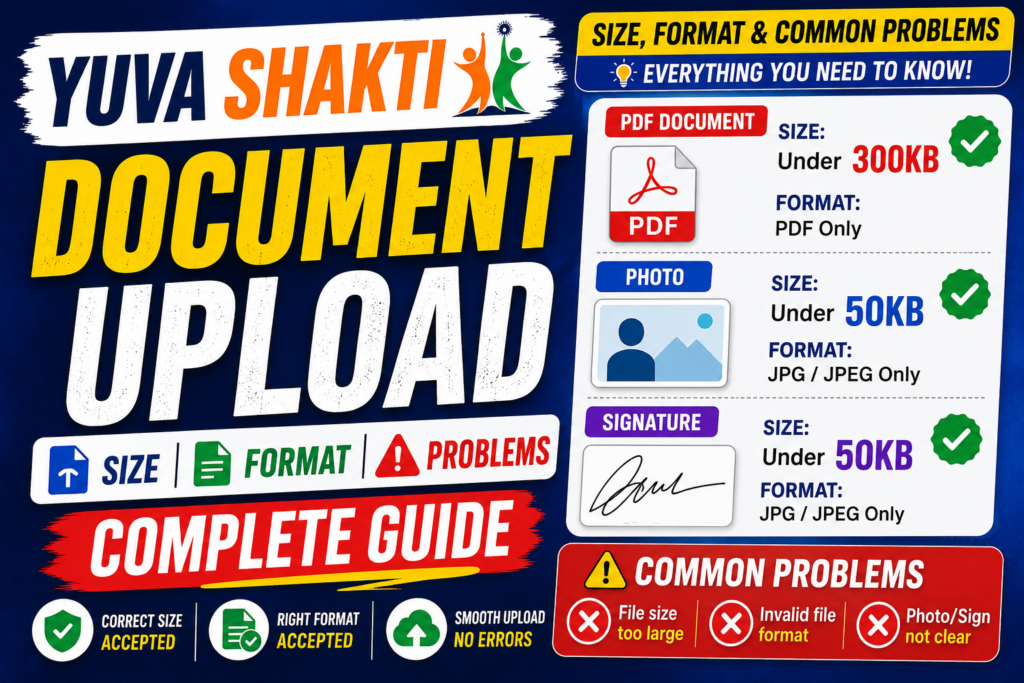
If you are planning to apply for the Yuva Shakti scheme, knowing the correct document upload requirements before the portal goes live will save you time and prevent errors during registration. This guide covers every required document, its accepted format, file size limit, and other key details — so you are fully prepared when applications open.
Is the Yuva Shakti Portal Open Yet?
The Yuva Shakti scheme application portal has not yet started. This page will be updated as soon as the registration process begins. Bookmark this page and check back for the latest updates on the Yuva Shakti application start date.
What Is the Yuva Shakti Scheme?
Yuva Shakti is a West Bengal government scheme that provides a monthly stipend of ₹3,000 to eligible youth. Like Yuba Sathi, applicants must register online and upload a set of documents to complete their application successfully.
Yuva Shakti Document Upload Requirements – Complete List
Prepare all documents listed below before the portal opens. Having the correct format and file size ready in advance will help you avoid upload errors and complete your application in one sitting.
Documents Required (PDF Format – Max 300 KB Each)
All the following documents must be self-attested, saved as PDF only, and each file must be 300 KB or smaller.
| # | Document | Format | Max Size |
|---|---|---|---|
| 1 | Madhyamik or equivalent Admit Card (Self Attested) | PDF only | 300 KB |
| 2 | Madhyamik or equivalent Mark Sheet / Certificate (Self Attested) | PDF only | 300 KB |
| 3 | Copy of Aadhaar Card (Self Attested) | PDF only | 300 KB |
| 4 | Copy of Voter Card (Self Attested) | PDF only | 300 KB |
| 5 | First page of Bank Passbook (Self Attested) | PDF only | 300 KB |
| 6 | SC / ST / OBC Certificate (if applicable, Self Attested) | PDF only | 300 KB |
Photo and Signature (JPG or PNG – Max 50 KB Each)
| # | Document | Format | Max Size |
|---|---|---|---|
| 7 | Recent Passport Size Photograph | JPG or PNG only | 50 KB |
| 8 | Applicant’s Signature | JPG or PNG only | 50 KB |
Mobile Number Requirement
A valid mobile number is mandatory for Yuva Shakti registration. An OTP or Secret PIN will be sent to this number during the application process. This mobile number will also be used for all future communication related to your application. Make sure the number is active and accessible before you begin.
Common Yuva Shakti Document Upload Problems (and How to Fix Them)
1. PDF File Size Exceeds 300 KB
Each PDF document must be 300 KB or smaller. Scanned documents from smartphones are often much larger than this limit.
Fix: Use a free online PDF compressor to reduce your file size below 300 KB before uploading.
2. Photo or Signature File Too Large
Your passport photo and signature image must each be 50 KB or smaller. Camera images from smartphones are usually several MB, which will cause the upload to fail.
Fix: Use a free online photo resizer or image compressor to bring your photo and signature under 50 KB before uploading.
3. Wrong File Format for Documents
The portal accepts PDF only for all certificates and identity documents. Uploading a JPG, PNG, or Word file will result in an upload error.
Fix: Scan your documents and save them as PDF. If you only have image files, use a free online JPG-to-PDF converter.
4. Wrong File Format for Photo or Signature
The photograph and signature fields accept JPG or PNG only — not PDF, HEIC, or WEBP.
Fix: Convert your photo or signature to JPG or PNG format before uploading.
5. Invalid or Inactive Mobile Number
If the mobile number entered during registration is switched off or unreachable, you will not receive your OTP or Secret PIN and cannot complete the application.
Fix: Use an active mobile number with network coverage before starting registration.
How to Compress a PDF to Under 300 KB for Yuva Shakti
- Open a free online PDF compressor (such as ilovepdf.com or smallpdf.com).
- Upload your scanned document.
- Click Compress.
- Confirm the output file is under 300 KB.
- Download the compressed file.
- Upload it to the Yuva Shakti portal.
How to Resize Your Photo or Signature to Under 50 KB for Yuva Shakti
- Open a free online image resizer or photo compressor.
- Upload your passport photo or signature image.
- Set the target size to below 50 KB.
- Download the compressed image.
- Upload it to the Yuva Shakti application portal.
Frequently Asked Questions
Has the Yuva Shakti scheme application started?
No. The Yuva Shakti portal has not yet opened for registration. Check back here for the latest updates on the application start date.
What is the Yuva Shakti stipend amount?
Eligible applicants will receive a monthly stipend of ₹3,000 under the Yuva Shakti scheme.
What documents are required for Yuva Shakti?
You need your Madhyamik Admit Card, Mark Sheet or Certificate, Aadhaar Card, Voter Card, Bank Passbook first page, caste certificate (if applicable), a recent passport size photo, and your signature.
What is the Yuva Shakti photo upload size?
Your passport size photograph must be in JPG or PNG format and must not exceed 50 KB.
What is the Yuva Shakti document upload size?
All PDF documents must be 300 KB or smaller each.
Which format should I use for Yuva Shakti documents?
All certificates and identity documents must be in PDF only. Your photo and signature must be in JPG or PNG format.
Why is my Yuva Shakti document not uploading?
The most common reasons are file size exceeding the limit, wrong file format, or missing self-attestation. Compress your files, convert to the correct format, and try again.